Paper: Kafka: a Distributed Messaging System for Log Processing
This is not too much of an opinionated writing piece. It is more of a consolidation of what I learnt about Kafka while reading the paper.
Important note: this is from the old Kafka paper, so some information is outdated.
What is Kafka?
Kafka is a messaging system. It was made by LinkedIn to handle large-scale activity stream data and operational data. Activity stream data means things like page views, searches, clicks, and user actions, while operational data means things like CPU, memory, request latency, and other system metrics.
A messaging system is basically a middle layer that lets one system send data and another system receive it asynchronously. The sender does not need to know who the receiver is, and the receiver does not need to be active at the exact moment the message is sent.
Kafka became a way to transport logs and events between systems reliably and at high throughput.
Overall Architecture
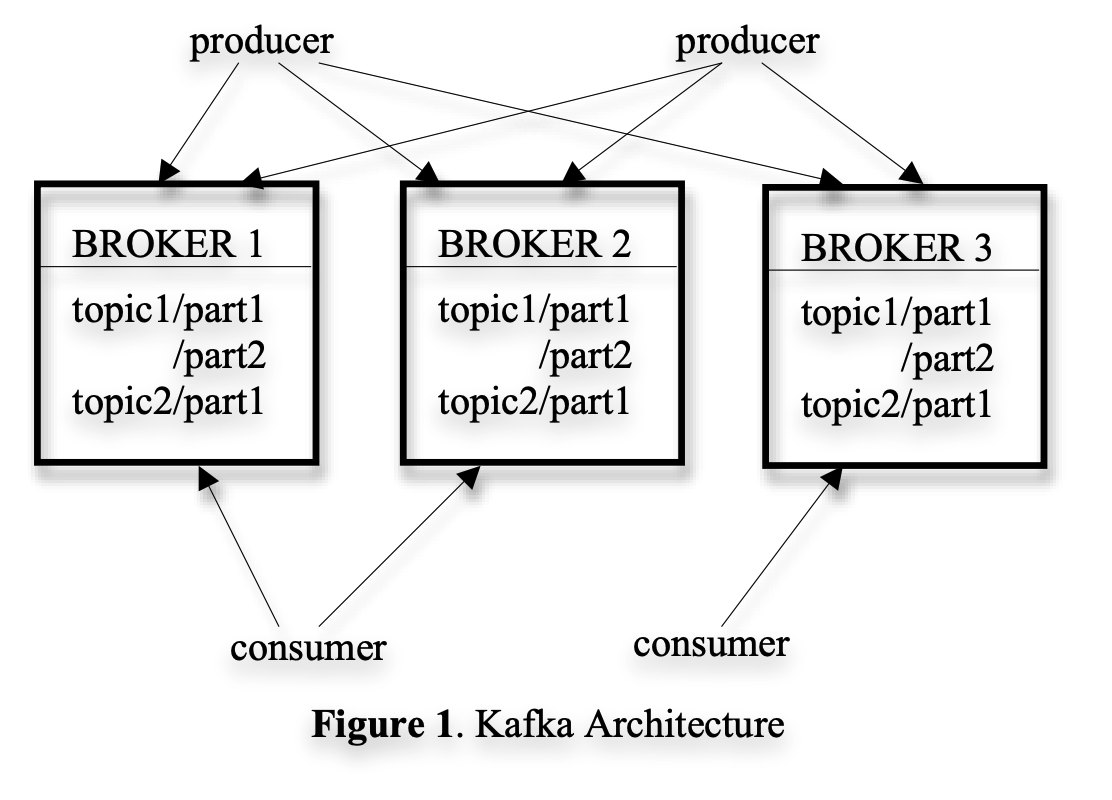
Terminology
Topic
A topic is a category of messages. For example, a company might have topics like:
user-clickspage-viewspaymentsserver-metrics
Topics are the logical names that producers write to and consumers read from.
Producer
A producer is any system that writes messages to Kafka.
Examples:
- A web server producing page view events
- A payment service producing transaction events
- A metrics agent producing CPU or memory measurements
Broker
A broker is a Kafka server. It stores messages and serves reads to consumers.
Kafka usually runs as a cluster of brokers. Each broker owns some partitions and stores the data for those partitions on disk.
Consumer
A consumer is any system that reads messages from Kafka.
Examples:
- A dashboard consuming metrics
- A data pipeline consuming activity logs
- A fraud detection system consuming payment events
Consumer Group
A consumer group is a set of consumers that jointly consume a topic. Kafka uses this to split work across multiple consumers.
For a given topic, each partition is consumed by only one consumer in a group at a time. This lets Kafka scale consumption horizontally while preserving order within a partition.
Why Kafka Was Needed
Before Kafka, LinkedIn had many services generating different kinds of logs and metrics. Those logs had to be sent to many different downstream systems: monitoring, analytics, data warehouses, and real-time applications.
The old approach had two main problems:
- Point-to-point pipelines created too much coupling between producers and consumers.
- Existing messaging systems were not designed for very high-throughput log data.
Kafka’s core idea was to treat messages more like logs than like traditional queues. Messages are appended to disk, retained for a configurable period, and read by consumers using offsets.
Partitions and Parallelism
Kafka splits each topic into partitions. A partition is an ordered, append-only log.
If a topic has one partition, then all messages are stored in one ordered sequence. If the topic has multiple partitions, messages can be spread across them.
This gives Kafka parallelism in two ways:
- Producers can write to different partitions.
- Consumers in a consumer group can read different partitions.
For example, if a topic has six partitions and a consumer group has three consumers, Kafka can assign two partitions to each consumer.
c1 -> p0, p1
c2 -> p2, p3
c3 -> p4, p5
If one consumer crashes, the remaining consumers can take over its partitions:
c1 -> p0, p1, p2
c3 -> p3, p4, p5
This is the main reason Kafka can scale reads without giving every consumer every message.
Storage Design
Kafka stores messages by appending them to log files on disk. Each message gets an offset, which is basically its position in the log.
This design is simple but powerful:
- Appending to a file is fast.
- Sequential disk access is much faster than random disk access.
- Consumers can remember where they stopped using offsets.
- Kafka does not need to delete each message immediately after it is consumed.
Instead of treating consumption as deletion, Kafka retains messages for a period of time. Consumers independently track their offsets.
This also means replay is natural. A consumer can go back to an earlier offset and reprocess messages if needed.
Why Sequential I/O Matters
One of the most interesting parts of the paper is how much performance comes from avoiding unnecessary work.
Kafka avoids many expensive operations:
- It writes sequentially instead of randomly.
- It relies on the operating system page cache.
- It avoids per-message acknowledgement overhead in the broker.
- It batches messages.
- It uses
sendfileto move data from disk to network more efficiently.
The key lesson is that Kafka’s performance is not just from a complicated distributed protocol. A lot of it comes from respecting how disks, memory, and operating systems actually behave.
Stateless Brokers
In the original design, Kafka brokers were mostly stateless with respect to consumers. The broker did not track which messages each consumer had already read.
Instead, consumers tracked their own offsets.
This makes the broker simpler and helps it support many consumers. It also means a consumer can choose to rewind and reread data if it wants to.
The tradeoff is that consumers have more responsibility. If a consumer commits an offset too early and then crashes, it may lose work. If it commits too late, it may process duplicates.
Consumer Coordination
Kafka uses consumer groups to coordinate which consumer reads which partition.
In the original paper, ZooKeeper was used for coordination. Consumers registered themselves, watched for changes, and rebalanced partition ownership when consumers joined or left.
For example, if a consumer crashes, the group detects that change and redistributes the partitions. The new owner can resume from the stored offset.
This means Kafka can tolerate consumer failures, though the application still needs to handle duplicate processing in some cases.
Delivery Guarantees
Kafka prioritised minimizing data loss, so the original design offered at-least-once delivery rather than exactly-once delivery.
This means messages should not be silently lost during normal operation, but duplicates can happen if a consumer crashes after processing a message and before committing its offset.
Kafka stores a CRC per message to detect corruption. If there is an I/O error or a corrupted message, Kafka can detect inconsistent CRCs and remove bad messages during recovery.
In the original paper, if a broker’s storage was permanently damaged, unconsumed messages on that broker could be lost because built-in replication was still future work at the time.
Takeaways
This was an interesting read because it shows how small design choices can create large performance gains. Sometimes the best optimization is not a very complex mechanism, but a careful decision that fits the workload.
The paper is quite old, so it mainly serves as a foundation for understanding message queues and Kafka’s original design. I am interested to see how Kafka has evolved as a modern system.